
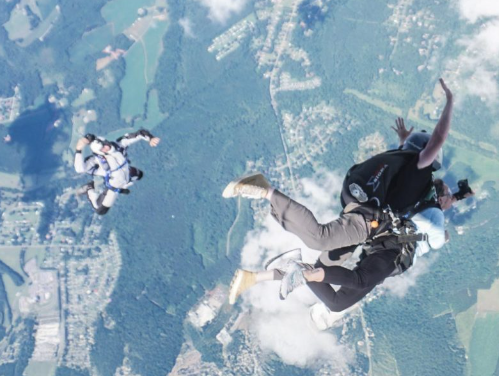
Skydiving is an exhilarating experience, and capturing it with a GoPro can make those memories last forever. However, getting the best footage requires understanding the right settings, angles, and techniques that suit the unique challenges of skydiving. In this post, we’ll explore the best GoPro settings to ensure your skydiving videos are nothing short of spectacular.
1. Choose the Right Resolution and Frame Rate
When it comes to skydiving videos, the resolution and frame rate you choose can significantly impact the final product. For high-quality footage, shooting at 4K resolution is recommended, as it captures more detail and allows you to crop in without losing clarity. However, if you’re looking to achieve a slow-motion effect in your clips, shooting at 1080p with a frame rate of 120fps can work well.
Additionally, setting your GoPro to 60fps in 4K can provide smooth playback without overwhelming your device’s storage. It’s wise to consider your editing capabilities and the device you plan to use for playback, as not all platforms can handle higher resolutions effectively.
-
- Use 4K at 60fps for high-quality footage.
-
- Opt for 1080p at 120fps for slow motion.
-
- Experiment with different settings during practice jumps.
-
- Check your GoPro’s storage space before the jump.
-
- Be mindful of battery life; higher resolutions may use more power.
2. Utilize the Proper Field of View (FOV)
The field of view (FOV) is crucial in capturing the vastness of the sky and the beautiful landscapes below. With the GoPro, you have options for narrow, linear, and wide FOV settings. Choosing a wide FOV is generally the best option for skydiving, as it allows you to capture everything from the stunning scenery to your fellow jumpers.
However, if you find that the wide FOV creates too much distortion, especially during fast movements, consider switching to linear mode, which offers a more realistic perspective without the fisheye effect. Remember that your perspective can change the emotional impact of the video, so experiment to find what best suits your style.
-
- Select the Wide FOV for expansive views.
-
- Use Linear FOV if fisheye distortion is an issue.
-
- Test both settings in practice jumps.
-
- Keep the camera angled toward the horizon.
-
- Consider the lighting when setting your FOV.
3. Adjust Your Exposure Settings
Proper exposure settings are essential for capturing the perfect skydiving video, especially given the rapidly changing light conditions during the descent. Setting your GoPro to Auto Exposure is a great starting point, but you may want to experiment with the Shutter Speed to prevent blurriness. A faster shutter speed can help maintain clarity, especially during high-speed descents.
Another critical factor is the use of ND (Neutral Density) filters to manage brightness. ND filters can reduce glare and improve video quality by allowing you to use a slower shutter speed, which enhances motion blur for a more cinematic look. Always monitor the light conditions and adjust your exposure settings accordingly when you’re in the air.
-
- Start with Auto Exposure for beginner jumps.
-
- Experiment with Shutter Speed to prevent blur.
-
- Use ND filters for improved quality.
-
- Monitor light conditions while ascending.
-
- Adjust settings before jumping; changes during descent can be tricky.
4. Secure Your Camera Properly
The excitement of skydiving and the wind resistance will impact how securely your camera is mounted. A sturdy, well-placed mount is vital for capturing stable footage. Attach your GoPro to your helmet or a chest mount for the best perspective; a head mount gives a first-person view, while a chest mount provides a different dynamic angle.
Another consideration is to ensure all mounts are tightened and checked thoroughly before the jump. Using backup safety straps can add an extra layer of security against losing your camera mid-air. Remember to do a test run with your setup during training dives to ensure everything is secure and functioning correctly.
-
- Use a helmet or chest mount for the best perspectives.
-
- Ensure all mounts are tightened before the jump.
-
- Perform a test run with the camera to check angles.
-
- Consider backup safety straps for security.
-
- Check alignment after your first practice jump.
5. Plan Your Shooting Angles
To make the most of your skydiving footage, it’s important to plan your shooting angles. Capturing the moments of freefall, parachute deployment, and landing can make your video more engaging. You might start with the GoPro facing forward during freefall to capture the exhilarating drop and switch to facing yourself or the landscape during deployment.
Additionally, think about the framing and composition as you dive. Knowing where to position your camera can enhance the final product significantly. A creative angle can help you tell a story throughout your skydiving journey, showcasing everything from the anticipation of the jump to the thrill of landing safely.
-
- Plan for a mix of angles to capture all moments.
-
- Start facing forward during freefall.
-
- Switch angles when deploying the parachute.
-
- Capture different jumpers or scenery during descent.
-
- Think about composition and framing while in the air.
Skydiving offers an unmatched thrill, and with the right GoPro settings, you can immortalize those incredible moments. As you prepare for your next jump, take note of these tips, experiment with your settings, and don’t hesitate to adjust as needed. Happy jumping, and capture those unforgettable memories!